Record an at-bat for a teammate
One person can keep the whole team's book: both apps ask who batted before the recorder opens, and the at-bat counts for whoever you pick rather than for you.
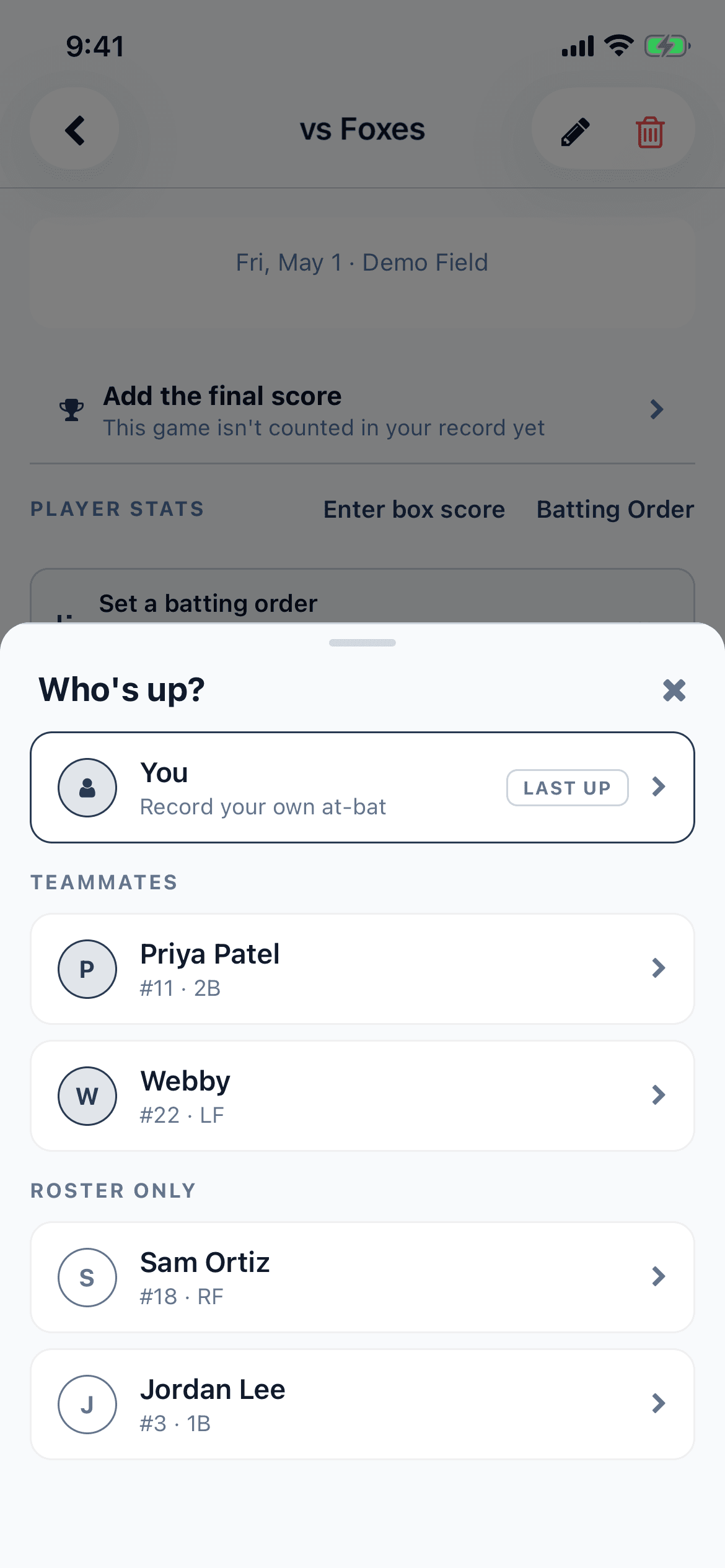
On a team game neither app assumes the at-bat is yours. Before the recorder opens it asks who batted, and the answer is a list in three groups: You, then Teammates — everyone on the team who is on the app — then Roster only, the names nobody has an account for. Whichever you pick, the at-bat counts for that person and not for you. You stay the one who recorded it, which is a different thing from having batted.
The question is only asked when it has more than one answer. A game you recorded on your own never shows it, and neither does a team game where you are the only name on the roster — both go straight into the recorder for you. Add one teammate or one roster-only name and the picker appears from then on.
On your phone
- Open the game — from the Games tab, or from the team's schedule — and tap Record, the round + button in the middle of the bottom bar.
- The sheet that slides up is headed "Who's up?". Your own row is at the top, reading You with "Record your own at-bat" under it, and Teammates and Roster only are the two headings below it.
- If the game has a batting order, the batter it says is up is pinned above everything with a Next up tag. With no order saved, whoever batted last is pinned instead, tagged Last up — handy for a player who is mid at-bat when you lose the signal.
- Tap the person. The recorder opens titled For and their name, which is your check before you save.
- Save the at-bat. Coming back to the game reopens the sheet for the next batter, so a whole half-inning is pick, record, pick, record; close it with the × or by tapping outside it to stop.
On the web
- Open the team game and click Record at-bat — in the game's header on a wide window, the round + button at the bottom right on a narrow one, or the Record at-bat button on the "No at-bats yet" panel while the game is still empty.
- A box headed "Who's batting?" opens instead of the recorder. If the game has a batting order, whoever the order says is up is on its own at the top under Next up.
- Under that, You is your own row, then Teammates, then Roster only — and every roster-only row is tagged roster at its right-hand end, so the two kinds of player are never confused at a glance.
- On a roster of more than eight a Find a player box appears at the top. Type part of a name or a jersey number; the Next up row and your own row step aside while you are searching.
- Click the person. The recorder opens with a chip at the top reading Batting and their name — that chip is your check that you picked the right row before you save anything.
Two kinds of player are deliberately left out of that list. Anybody who answered coach on this team is not offered, because a coach does not bat — that is the per-team answer rather than the Player/Coach setting on your own profile, and it is on the team's Members tab. Somebody who has been taken off the team is not offered either, even though their at-bats stay in the team's totals. And the list is the team's: the apps will not let you record for somebody who is not on the roster of the game you are in.
What you have saved is theirs. It counts in their line on the box score, in their season totals, on their spray chart and in the team's table, and it reaches their own phone on the next sync with nobody having to do anything. It never counts for you. If it needs fixing later, anyone on the team can do it, on either app, whoever recorded it. A game scored play by play is corrected from its play log instead.
If you are keeping the book for the whole side every week, the other route is worth a look: scoring the game play by play walks the batting order for you, so there is no picker to answer at all and the RBIs are worked out from where the runners finished.
Related guides
Still stuck?
Try the rest of the guides or the support page. Sending feedback from inside the app reaches a real person.