Record where the ball went
Tap the field while you record an at-bat — one tap, genuinely optional, and the only thing every spray chart and zone breakdown is drawn from.
Where the ball went is one tap, and it is the one part of an at-bat that is labelled optional and really is. Skip it and the outcome, the RBIs and every number on your batting line come out exactly the same. What you lose is the picture: an at-bat with no location is on no spray chart and in no zone, and on the phone the Spray Chart row does not even appear on the Stats tab until something has a location on it.
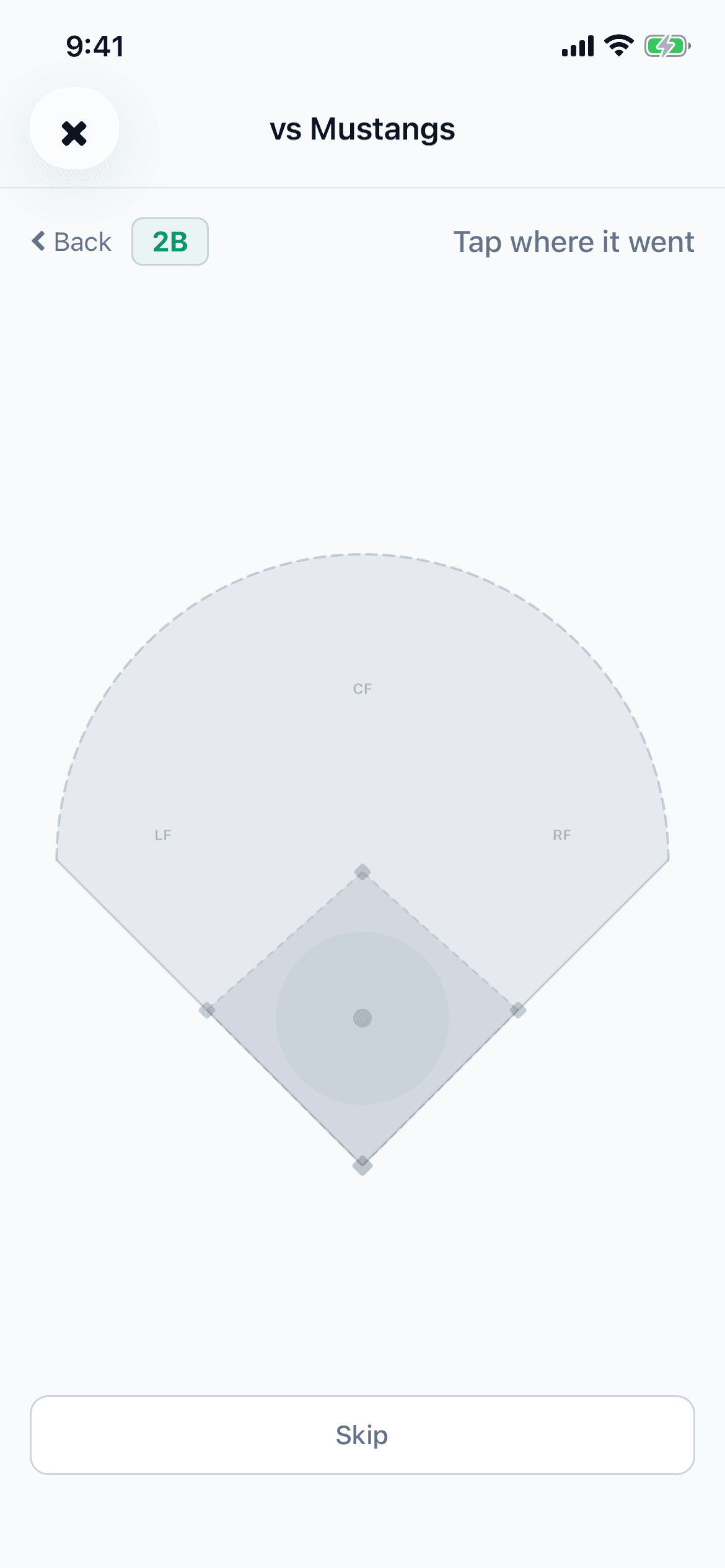
The field is the same drawing on both apps, and there is nothing to line up or drag. Home plate sits at the bottom in the middle, the infield diamond above it with first base on the right and the mound in the middle of it, the two foul lines run out to the corners, and the outfield fence curves across the top. Touch the spot where the ball came down — or where the fielder picked it up, on a ground ball — and one dot appears there. Touch somewhere else and the dot moves. There is only ever one dot per at-bat.
The field is only offered for a ball that was actually hit: the four hits, the four named outs (ground, fly, line and pop), a double play, a sacrifice fly or bunt, a fielder's choice, and reaching on an error. A walk, a hit by pitch and any strikeout skip the step, because there is nothing to place. On a wide browser window, where the field is on screen the whole time, it fades out instead and says "Not typical for" whichever outcome you picked.
On your phone
- Open the Games tab, tap the game, then tap Record.
- Tap the outcome. For a batted ball the Location step opens next: the outcome sits on a coloured pill at the top with "Tap where it went" beside it, and Back on the left returns to the grid.
- Tap the field where the ball came down, and the recorder moves on to "How many RBIs?" by itself. Skip goes on without a dot. If the spot was wrong, Back returns to the field with your dot still there: tap elsewhere to move it, or Next to keep it.
- If the outcome offers a batted-ball type, pick one under Trajectory on the "How many RBIs?" screen, above the RBI buttons — Ground Ball, Line Drive, Fly Ball, Pop Up or Bunt. Tapping the one already selected clears it again.
- Then tap Save. It reads "Save, no RBI" until you pick a number.
On the web
- Open the game and click Record at-bat, then pick the outcome. A batted ball takes you on to the field; a walk or a strikeout goes straight to the details.
- On a wide window the field is already there — the card on the right headed Hit Location (optional) — and you can click it any time before you save. On a phone-sized window the recorder moves to its Location step first, headed "Tap the field where the ball went".
- Click where the ball came down. On a wide window the dot lands where you clicked; click again to move it. On a phone-sized window the click also moves you on to Details, and Back returns to the field with the dot still there and Next to carry on with it.
- If you did not see where it went, Skip under the field goes on to Details without a dot. The at-bat is simply saved with no location.
- If the outcome offers a batted-ball type, pick one under Trajectory — Ground Ball, Line Drive, Fly Ball, Pop Up or Bunt. It is beside the field on a wide window and on Details on a phone-sized one. It is only asked for hits, a fielder's choice and reaching on an error, where the same outcome can come off the bat several ways; an outcome whose name already says it, like Ground Out or Sac Fly, does not ask.
What the tap feeds is the spray chart — on the game's own page, and for the whole season under Performance in the website's sidebar or the Spray Chart row on the phone's Stats tab. Each dot is coloured by what the at-bat was: green for a single, blue for a double, purple for a triple, gold for a home run, red for an out, and cyan for a fielder's choice or reaching on an error, with its short code — 1B, GO and so on — printed inside it. Tap or click a dot and a card under the chart says which at-bat it was.
Zones, one of the spray chart's views, splits the field into the infield and left, centre and right field and shows what you hit in each. Those averages are worked out from balls in play alone, so they read much higher than a season batting average — the caption under the chart says so — and the at-bats with no location are reported in a line of their own underneath rather than quietly left out. A game typed in from a box score has no locations at all, which is the usual reason that number is large.
A location can be added or moved long after the game: open the at-bat and change it there — the pencil on the row on the website, the row itself on the phone. It is also the one field that stays editable on a game that was scored play by play, where the outcome and the RBIs belong to the play log instead.
If the outcome you want is not in the list at all, that is a different setting: five of the rarer outcomes ship switched off.
Not sure what a stat on this screen means? The glossary explains it.
Related guides
Still stuck?
Try the rest of the guides or the support page. Sending feedback from inside the app reaches a real person.